On the normal web, a user might visit https://gmail.com/, their browser will download the Gmail
user interface which then runs in their browser and connects back to the Gmail servers.
On Freenet the user interface is downloaded from a Freenet contract, and it interacts with contracts and delegates by sending messages through the Freenet core.
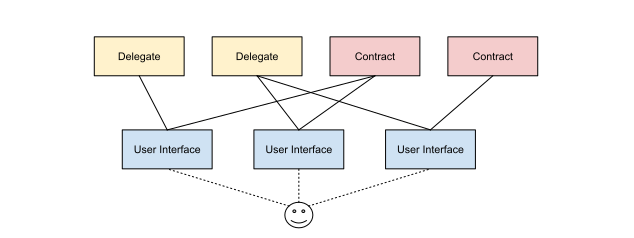
These UIs are built using web technologies such as HTML, CSS, and JavaScript, and are distributed over Freenet and run in a web browser. UIs can create, retrieve, and update contracts through a WebSocket connection to the local Freenet peer, as well as communicate with delegates.
Because UIs run in a web browser, they can be built using any web framework, such as React, Angular, Vue.js, Bootstrap, and so on. There are two first-class paths:
- TypeScript + Vite: a standard web frontend that talks to the node over WebSocket using the published TypeScript SDK (below). This is the recommended path for most apps.
- Dioxus (Rust to WebAssembly): a Rust UI framework that lets you share types and logic with your contracts. See River for a complete example.
The TypeScript SDK
The SDK is published to npm as
@freenetorg/freenet-stdlib. Install
the latest release (no version pin needed, npm fetches the current one):
npm install @freenetorg/freenet-stdlib
The essentials are below; for the complete API (every request/response class, update types, streaming, and delegates) see the TypeScript SDK reference.
Connecting to the node
The SDK’s FreenetWsApi opens a WebSocket to the local node. Derive the URL from the page location
rather than hardcoding a host or port, because the host is not known ahead of time when your app is
served from a Freenet container:
import {
  FreenetWsApi,
  ContractKey,
  GetRequest,
  SubscribeRequest,
  UpdateRequest,
  UpdateData,
  UpdateDataType,
  DeltaUpdate,
} from "@freenetorg/freenet-stdlib";

// The third argument is the auth token. When your app runs inside the
// Freenet web-container shell, leave it empty; the shell injects auth.
const wsUrl = new URL(`ws://${location.host}/v1/contract/command`);
const api = new FreenetWsApi(wsUrl, handler, "");
handler is a ResponseHandler object: the node pushes results and live updates to its callbacks
(onContractGet, onContractUpdateNotification, onErr, onOpen, and more). A minimal handler:
const handler = {
  onOpen: () => console.log("[freenet] connected"),
  onContractGet: (r) => {
    /* initial state */
  },
  onContractUpdateNotification: (n) => {
    /* live delta from a subscription */
  },
  onContractPut: () => {},
  onContractUpdate: () => {},
  onContractNotFound: () => {},
  onDelegateResponse: () => {},
  onErr: (e) => console.error("[freenet]", e.cause),
};
Reading, subscribing, and updating
The request methods are promise-based (await); each also fires the matching handler callback. The
default request timeout is 30 seconds.
const contractKey = ContractKey.fromInstanceId("<base58-instance-id>");

// GET: fetch current state (pass true to also fetch the contract code)
const response = await api.get(new GetRequest(contractKey, true));
const state = JSON.parse(new TextDecoder().decode(Uint8Array.from(response.state)));

// SUBSCRIBE: receive real-time updates via onContractUpdateNotification
await api.subscribe(new SubscribeRequest(contractKey, []));

// UPDATE: send a delta
const deltaBytes = new TextEncoder().encode(JSON.stringify(myDelta));
const delta = new DeltaUpdate(Array.from(deltaBytes));
const update = new UpdateData(UpdateDataType.DeltaUpdate, delta);
await api.update(new UpdateRequest(contractKey, update));
Reads are not correlated to their responses: the SDK settles get() promises in FIFO order, so do
not run multiple get() calls concurrently; serialize them. See
Request ordering in the SDK reference.
Packaging notes
When your UI is served from a Freenet web container it runs inside a sandboxed iframe with a strict Content Security Policy:
- Set
base: "./"in your Vite config so assets resolve relative to the container URL. - Prefer vendoring third-party CSS/JS locally (copy into
public/); the gateway applies a Content Security Policy, so verify any remote origins (such as a font CDN) against a real gateway.
See the tutorial for an end-to-end walkthrough and Raven (a decentralized microblogging app) for a complete TypeScript + Vite reference.